Tag: Explainer

Debugging an LLM Training Run

LLM training has more moving parts than classic machine learning, but the debugging method is similar. Engineers check the training pipeline, data, objective, optimization, and evaluation in that order.

The fastest first test is to overfit a tiny dataset.

Take 100 examples and train on them many times. The model should almost memorize them. If it cannot, the problem is probably not data coverage. The problem may be the loss function, masking, tokenizer, optimizer, gradient flow, or training code.

[…265 words]

How Do You Prove a Coding Skill Works? A Ponytail Case Study

OpenAI wrote a post called Testing Agent Skills Systematically with Evals. The point is simple: if you only judge a skill by feel, you won’t notice when it gets worse. You need a test set, a pass/fail check, and a score you can repeat.

Ponytail is a good example to study. It’s a skill that makes an AI agent write less code. Its claim is easy to test, so its benchmarks folder is a good case study of the same idea, but for a coding skill instead of an agent skill.

[…849 words]

AI Foundations 1 - How AI Models Work

Calling an AI model feels like calling a function: you pass in some input, you get output back. But it breaks one rule you’d normally rely on — call it twice with the same input, and you can get two different answers.

Deterministic vs. probabilistic

A sorting function is deterministic. Feed it [3, 1, 2] a hundred times, get [1, 2, 3] a hundred times. The logic is fixed, written line by line by a person.

[…445 words]

AI Foundations 2 - Hallucinations and Limitations

Sometimes a model states something false with total confidence. No hedging, no “I’m not sure” — just a wrong answer delivered like a fact. That’s a hallucination.

It’s not lying, exactly. The model isn’t tracking truth at all. It’s producing text that looks like a correct answer would look.

Why hallucinations happen

A model is trained to predict plausible next words, not to check facts against a database. When it doesn’t know something, it doesn’t stop and say so — it keeps generating the most likely-sounding continuation, true or not.

[…326 words]

AI Foundations 3 - Tokens and Pricing

Models don’t read words the way you do. They break text into chunks called tokens, and a token isn’t the same thing as a word. “Cat” might be one token. “Unbelievable” might split into two or three. Code is chunked the same way — brackets, keywords, and indentation all count.

Why tokens matter

Every token costs something, and every token takes time to produce. A short prompt on a small file runs fast and cheap. Paste in a ten-thousand-line log file and ask for a summary, and you’ll feel both the wait and the bill.

Input and output tokens

Input tokens are everything you send in: your prompt, any files, the conversation so far. Output tokens are what the model generates back. They’re counted and priced separately, and they behave differently — one you control directly, the other you only shape indirectly by asking for shorter or longer answers.

Pricing

Providers charge per token, usually in price-per-million units, and output tokens almost always cost more per token than input tokens. Makes sense — generating text is the harder, slower half of the job.

Streaming

Rather than making you wait for the entire response, most models can stream tokens out one at a time as they’re generated. That’s why chat interfaces show text appearing word by word instead of all at once. It doesn’t make the model faster overall, but it makes the wait feel shorter.

Token optimization

A few habits keep both cost and latency down:

  • Don’t paste in more context than the task actually needs.
  • Reuse a stable prompt prefix where the provider supports caching it — repeated setup shouldn’t be repriced every call.
  • Ask explicitly for a short answer when a short answer is all you need. Models default to being thorough, which is usually not what you’re paying for.

Previous: AI Foundations 2 - Hallucinations and Limitations Next: AI Foundations 4 - Context

AI Foundations 4 - Context

Everything a model can see for the current task lives in its context — think of it as short-term memory that gets rebuilt fresh each time you ask something. Nothing outside that window exists to the model, no matter how obvious it seems to you.

System and user prompts

Most setups split instructions into two layers. A system prompt sets the general rules — tone, role, boundaries — and usually stays fixed across a whole session. A user prompt is the specific ask for this particular turn. Same system prompt, different user prompts, very different outcomes each time.

[…253 words]

AI Foundations 5 - Tool Calling

On its own, a model can only produce text. It can’t check today’s date, read a file, or run your test suite — it can only describe what those things might look like. Tools close that gap: they let the model reach out and actually do something, then bring the result back into the conversation.

Basic tool-call flow

The pattern is always roughly the same. The model decides a tool would help, picks which one, and fills in the arguments it needs. Something outside the model — the application — actually runs it. Whatever comes back gets fed into the model’s context, and it decides what to do next based on that.

[…280 words]

AI Foundations 6 - Prompting and Evaluation

The exact same model can look brilliant or mediocre depending entirely on how you ask it something. Swap a vague instruction for a specific one, and the quality, the format, even the correctness of the answer can shift noticeably — without touching the model at all.

Prompt structure

A prompt that works tends to spell out the same handful of things: what the task actually is, what context matters, and what shape the answer should take. Keeping the role, the task, any constraints, and any examples visibly separate makes a long prompt easier for the model to parse — and easier for you to debug later.

[…317 words]

AI Foundations 7 - Agents and Autonomous Loops

One tool call answers one question. An agent chains many of them together: decide what to do, do it, look at what happened, decide again. It keeps cycling through that loop until the task looks done, or until something stops it.

Planning

Before diving into a large task, an agent can lay out a rough sequence of steps first rather than acting on the very first idea that comes to mind. That plan isn’t fixed — new information from an earlier step can send it back to revise later steps, sometimes more than once.

[…267 words]

Managing an Agent's Context Window

The context window is an agent’s working memory. Every token in it adds computation, so a longer context window costs more. Managing that budget well is one of the most important engineering decisions in agent design.

Most harnesses split the context window into a few parts: the system prompt, memory, tool definitions, chat history, and other things. The sum of these parts must not go over the window’s size. A window that grows too large causes context rot: the model gets “dumb” and starts forgetting things. Besides compacting, a good practice is to run in short sessions — Claude Code’s /clear command helps with that.

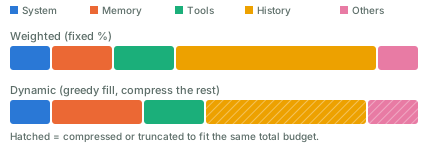
Here are two ways to allocate the budget among these parts:

Two stacked bars comparing context-window budget allocation. The first bar splits a fixed percentage to system prompt, memory, tools, history, and others. The second bar fills system and tools at their required size first, gives memory and history more room, and compresses history and others to still fit the same total budget.

  • Weighted. Give each part a fixed share, say 10% for the system prompt and 50% for history. This is simple, but wastes capacity when a part doesn’t need its full share.
  • Dynamic weighted. Adjust the shares as you go. A simple version is greedy: fill the highest-priority parts first, then compress or truncate the lower-priority ones.

Compact the context window when it keeps growing. Common approaches:

  • Summarize old turns and replace them with a shorter version.
  • Select relevant messages and carry them over as-is; drop the rest.
  • Slide a window (FIFO): keep only the most recent turns. Simple, but it loses old context.
  • Hybrid: keep recent turns verbatim, and summarize the old ones.

For the summarization step itself, a common method is recursive summarization: split the history into chunks, run an LLM call on each chunk, then combine the results into a final summary.

You can also come up with new approaches. It’s a trade-off, and a big loss of context is what you want to avoid.

Pretraining

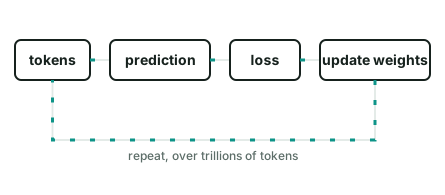
Pretraining is the first stage of training a language model. Its main task is to predict the next token. Take “The capital of France is ___.” A pretrained model reads “The capital of France is” and predicts the next token, “Paris.”

The model makes a prediction, compares it with the real token, calculates the error, and updates its weights.

To pretrain a model, you repeat this step over and over, on a huge pile of text, code, and other data:

Animated diagram of the pretraining loop: tokens feed a prediction, the prediction is compared to the real token to get a loss, the loss updates the model’s weights, and the loop repeats.

After pretraining, the model has picked up language, facts, code, and common reasoning patterns from that data.

Pretraining is only the first stage. Compare it with the two stages that usually follow:

StageGoalDataFeedback signal
PretrainingLearn general language patternsHuge, mixed text and codeNext-token prediction error
Fine-tuningLearn a specific task or formatSmall, curated examplesDifference from a labeled output
RLLearn a preferred behaviorThe model’s own outputsA reward score

Pretraining teaches a model what patterns exist in its data. Feed it a lot of code, and it gets better at code. Feed it many tool-call examples, and tool use can become a natural part of its output.

RMSNorm

Most modern language models, like Llama and Mistral, normalize activations with Root Mean Square Normalization (RMSNorm). Here is what it does, and a PyTorch module you can drop into a model.

The problem it solves

Inside a neural network, a layer’s output feeds the next layer as input. Those values can become too big or too small as they pass through layer after layer. A value that doubles at each of 40 layers is unusable by the end. Normalization rescales the values back to a steady range before they move on, so training stays stable.

[…388 words]

Agent Concepts vs Linux Concepts

A lot of agent infrastructure is old Linux ideas with new names.

AgentLinux
IdentityUser
Least privilegePermissions
WorkspaceHome directory
RuntimeProcess
Schedulercron
ObservabilityLogs
Human in the loopSSH
IsolationContainer / VM
Self healingRestart policy
Resource limitscgroups
Loopfor i in $(seq 1 $MAX_ITERATIONS); do; ... done
Tool accessExecutable permissions

An agent is an untrusted process that can use tools. A lot of the execution layer concepts already exists in Linux.

Give AI Agents Git Access, Not Git Credentials

If you run a coding agent inside a sandbox VM, the usual advice is simple: isolate the filesystem, restrict network access, don’t mount your home directory, don’t expose SSH keys or cloud credentials.

But that leads to one question: without an SSH key, how would the agent run git push safely?

You could give the VM an SSH key or a GitHub token. That basically diminishes the purpose of the VM, and gives the agent more access than it needs. So, don’t do this. AI agents had bad reputation.

Use a proxy

Configure a proxy outside the sandbox.

Inside the VM, git push never talks to github.com directly — it points at the proxy instead. The VM holds no GitHub credential at all. The proxy is what attaches a real token before forwarding the request upstream, so the token stays invisible to the model.
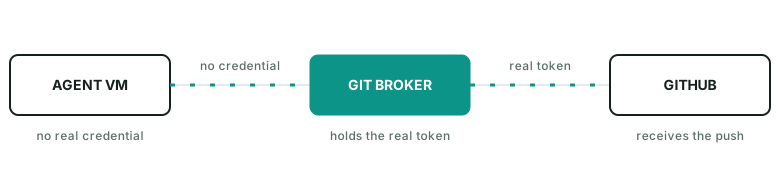
Agent VM sends a git push with no credential to a Git Broker, which attaches the real token before forwarding to GitHub.

The broker can even enforce rules such as:

  • allow fetch
  • allow push agent/run-123
  • deny push main
  • deny force push
  • deny other repos

The agent does not need to hold the real GitHub credential.

A practical guide

In practice, the proxy can be as simple as an nginx docker process listening on 127.0.0.1:8082->80/tcp. It injects gh auth token into outgoing requests as the auth header.

Inside the VM, the push command looks like git push https://github.com/name/repo.git main.

Getting an agent to use it doesn’t take much: just hint it. Something like “push via GitHub broker on host port 8082 instead of origin” works well — the agent figures out the rest on its own.

I published a gist here for quickly launching such a github-broker.

The general pattern

This is a useful way to think about agent permissions in general. A runtime does not need your identity. It needs a small set of capabilities for the current task. For git push, that capability is usually: this repo, this branch, for a short time.

References
Partial Derivatives, Reverse-Mode Autodiff

A partial derivative measures how much a function changes when you nudge one input, holding every other input fixed. For f(x, y) = x²y + y + 2, the partial derivative with respect to x asks: if y stays put, how fast does f move as x moves?

Manual differentiation

Mathematically, we know that ∂f/∂x = 2xy and ∂f/∂y = x² + 1, using a handful of rules:

  • the derivative of a constant is 0
  • the derivative of ax is a
  • the derivative of x^a is a·x^(a-1)
  • the derivative of a sum is the sum of the derivatives: (u + v)' = u' + v'
  • the derivative of a product follows the product rule: (u·v)' = u'v + uv'

But how can a program know that?

[…913 words]

Vanilla Neural Networks

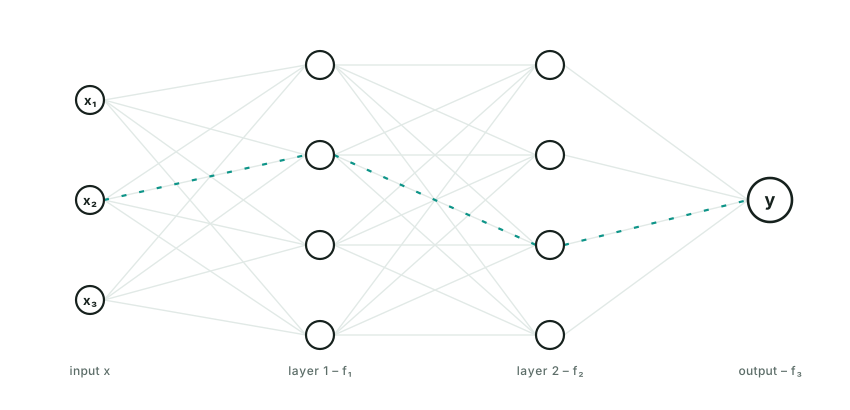
A neural network is just a math function: y = FNN(x).

FNN has a nested form. Think of it as a stack of layers. A 3-layer neural network that returns a scalar value looks like this:

y = FNN(x) = f₃(f₂(f₁(x)))

x flows through three layers, f one, f two, f three, each computing g of W x plus b, to produce y.

Each f — f₁, f₂, … fₙ — has the same form:

f(x) = g(Wx + b)

W (the weight matrix) and b (a bias vector) are the learned parameters, usually trained via gradient descent. g is the activation function, and it can be chosen differently for each layer.

Wx + b is linear — wrapping it in g is what makes each layer non-linear. Without g (or with g chosen to be linear), the whole FNN collapses into a single linear function: stack 100 such layers and the composition of linear maps is still just one linear map, no matter how deep the network looks. g is what lets a stack of layers approximate anything more than a straight line. Popular choices for g are sigmoid and ReLU.

There are many variants of neural networks — CNNs, RNNs, transformers, and more — each shaped by assumptions about the data they process. The example above, where every neuron in one layer connects to every neuron in the next, is the plainest of them: a multilayer perceptron (MLP), also called a vanilla neural network.

Agent Skills

Agent skills let humans organize, distribute, discover, and compose an agent’s capabilities. A skill is typically a markdown file, with optional scripts, references, and evals bundled alongside it.

Think of an agent skill as programming in natural language, written in markdown. It can hold knowledge, workflow logic, guardrails, required tools — basically anything.

Some outstanding skills:

  • autoresearch instructs an agent to tirelessly tune models. It defines a workflow — really a loop — and states plainly what the agent can edit and what it can’t.
  • img2threejs turns an image into a 3D model. It defines a workflow with heavy guardrails at every stage.
  • superpowers defines a software development lifecycle. It has an opinionated, mandatory way to deliver software.

You probably already do some of this by hand. Just write it down, name the file SKILL.md, and let the agent pick it up. It’s that simple.

[…718 words]

What Is an Agent Harness?

An oversimplified but useful equation: agent harness ≈ ai agent − model.

Take the model out of an AI agent, and what’s left is the harness: the software that gives the model context, tools, state, permissions, and an environment to act in. A model can reason and generate text. A harness builds on top of that and does work over multiple steps.

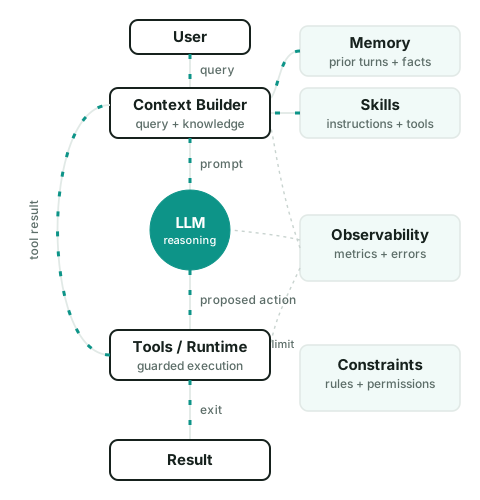
A useful way to think about an agent harness is as a loop:

A query flows from the user through the context builder, the LLM, and tools and runtime, before the result comes back. Memory and skills both feed into the context builder, and tool results loop back to the context builder too. Observability watches every stage, and constraints limit the runtime.

  1. The harness starts with the current state and a new observation, such as a user message or tool result.
  2. The context builder selects the instructions, state, memory, skills, tool definitions, and other information the model needs for this step.
  3. The model produces a proposed next action. This may be a tool call, a message, a state update, or a final answer.
  4. The harness checks whether that action is allowed.
  5. The runtime executes it.
  6. The result becomes a new observation, the state is updated, and the loop continues until exit.

To sum up, The harness decides what the model can see, what actions to execute, what data flows to next step and when to stop the loop.

Further reading