Tag: Ai-Engineering

Debugging an LLM Training Run

LLM training has more moving parts than classic machine learning, but the debugging method is similar. Engineers check the training pipeline, data, objective, optimization, and evaluation in that order.

The fastest first test is to overfit a tiny dataset.

Take 100 examples and train on them many times. The model should almost memorize them. If it cannot, the problem is probably not data coverage. The problem may be the loss function, masking, tokenizer, optimizer, gradient flow, or training code.
[…265 words]

How Do You Prove a Coding Skill Works? A Ponytail Case Study

OpenAI wrote a post called Testing Agent Skills Systematically with Evals. The point is simple: if you only judge a skill by feel, you won’t notice when it gets worse. You need a test set, a pass/fail check, and a score you can repeat.

Ponytail is a good example to study. It’s a skill that makes an AI agent write less code. Its claim is easy to test, so its benchmarks folder is a good case study of the same idea, but for a coding skill instead of an agent skill.

[…849 words]

AI Foundations 1 - How AI Models Work

Calling an AI model feels like calling a function: you pass in some input, you get output back. But it breaks one rule you’d normally rely on — call it twice with the same input, and you can get two different answers.

Deterministic vs. probabilistic

A sorting function is deterministic. Feed it [3, 1, 2] a hundred times, get [1, 2, 3] a hundred times. The logic is fixed, written line by line by a person.

[…445 words]

AI Foundations 2 - Hallucinations and Limitations

Sometimes a model states something false with total confidence. No hedging, no “I’m not sure” — just a wrong answer delivered like a fact. That’s a hallucination.

It’s not lying, exactly. The model isn’t tracking truth at all. It’s producing text that looks like a correct answer would look.

Why hallucinations happen

A model is trained to predict plausible next words, not to check facts against a database. When it doesn’t know something, it doesn’t stop and say so — it keeps generating the most likely-sounding continuation, true or not.

[…326 words]

AI Foundations 3 - Tokens and Pricing

Models don’t read words the way you do. They break text into chunks called tokens, and a token isn’t the same thing as a word. “Cat” might be one token. “Unbelievable” might split into two or three. Code is chunked the same way — brackets, keywords, and indentation all count.

Why tokens matter

Every token costs something, and every token takes time to produce. A short prompt on a small file runs fast and cheap. Paste in a ten-thousand-line log file and ask for a summary, and you’ll feel both the wait and the bill.

Input and output tokens

Input tokens are everything you send in: your prompt, any files, the conversation so far. Output tokens are what the model generates back. They’re counted and priced separately, and they behave differently — one you control directly, the other you only shape indirectly by asking for shorter or longer answers.

Pricing

Providers charge per token, usually in price-per-million units, and output tokens almost always cost more per token than input tokens. Makes sense — generating text is the harder, slower half of the job.

Streaming

Rather than making you wait for the entire response, most models can stream tokens out one at a time as they’re generated. That’s why chat interfaces show text appearing word by word instead of all at once. It doesn’t make the model faster overall, but it makes the wait feel shorter.

Token optimization

A few habits keep both cost and latency down:

  • Don’t paste in more context than the task actually needs.
  • Reuse a stable prompt prefix where the provider supports caching it — repeated setup shouldn’t be repriced every call.
  • Ask explicitly for a short answer when a short answer is all you need. Models default to being thorough, which is usually not what you’re paying for.

Previous: AI Foundations 2 - Hallucinations and Limitations Next: AI Foundations 4 - Context

AI Foundations 4 - Context

Everything a model can see for the current task lives in its context — think of it as short-term memory that gets rebuilt fresh each time you ask something. Nothing outside that window exists to the model, no matter how obvious it seems to you.

System and user prompts

Most setups split instructions into two layers. A system prompt sets the general rules — tone, role, boundaries — and usually stays fixed across a whole session. A user prompt is the specific ask for this particular turn. Same system prompt, different user prompts, very different outcomes each time.

[…253 words]

AI Foundations 5 - Tool Calling

On its own, a model can only produce text. It can’t check today’s date, read a file, or run your test suite — it can only describe what those things might look like. Tools close that gap: they let the model reach out and actually do something, then bring the result back into the conversation.

Basic tool-call flow

The pattern is always roughly the same. The model decides a tool would help, picks which one, and fills in the arguments it needs. Something outside the model — the application — actually runs it. Whatever comes back gets fed into the model’s context, and it decides what to do next based on that.

[…280 words]

AI Foundations 6 - Prompting and Evaluation

The exact same model can look brilliant or mediocre depending entirely on how you ask it something. Swap a vague instruction for a specific one, and the quality, the format, even the correctness of the answer can shift noticeably — without touching the model at all.

Prompt structure

A prompt that works tends to spell out the same handful of things: what the task actually is, what context matters, and what shape the answer should take. Keeping the role, the task, any constraints, and any examples visibly separate makes a long prompt easier for the model to parse — and easier for you to debug later.

[…317 words]

AI Foundations 7 - Agents and Autonomous Loops

One tool call answers one question. An agent chains many of them together: decide what to do, do it, look at what happened, decide again. It keeps cycling through that loop until the task looks done, or until something stops it.

Planning

Before diving into a large task, an agent can lay out a rough sequence of steps first rather than acting on the very first idea that comes to mind. That plan isn’t fixed — new information from an earlier step can send it back to revise later steps, sometimes more than once.

[…267 words]

Can a Fruit Fly Brain Learn Numbers?

Following up on A Fruit Fly Circuit as a Speech Emotion Reservoir: I pulled the real 499-neuron circuit out of MaleCNS v1.0 and ran it as a reservoir on MNIST, in PyTorch and in MLX. Code and data: gist.

Getting the real circuit

MaleCNS v1.0 is a public, CC-BY electron-microscopy reconstruction of a male fruit fly’s central nervous system.

I applied the selection rule stated in the original article: central-brain intrinsic neurons, traced status, ranked by strength, top 512, largest strongly connected component, edges with at least 5 synaptic contacts. This landed on exactly 499 neurons — the same count the paper reports — with 13,452 directed edges, against their reported 15,865. Their exact ranking formula for “strongest” isn’t published, so this is the closest match I could reproduce.

[…634 words]

A Fruit Fly Circuit as a Speech Emotion Reservoir

We taught a fruit fly to hear human emotion uses a 499-neuron circuit from the male fruit fly brain and central nervous system, mapped by FlyEM at Janelia with Cambridge, the MRC Laboratory of Molecular Biology, and Google Research.

The circuit is fully connected: every neuron can reach every other neuron through a directed path, across 15,865 connections built from 867,344 synaptic contacts.

The team wired this circuit into a speech emotion classifier using reservoir computing and an identify human emotion like happy, angry from voice inputs.

Managing an Agent's Context Window

The context window is an agent’s working memory. Every token in it adds computation, so a longer context window costs more. Managing that budget well is one of the most important engineering decisions in agent design.

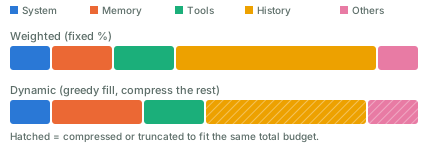
Most harnesses split the context window into a few parts: the system prompt, memory, tool definitions, chat history, and other things. The sum of these parts must not go over the window’s size. A window that grows too large causes context rot: the model gets “dumb” and starts forgetting things. Besides compacting, a good practice is to run in short sessions — Claude Code’s /clear command helps with that.

Here are two ways to allocate the budget among these parts:

Two stacked bars comparing context-window budget allocation. The first bar splits a fixed percentage to system prompt, memory, tools, history, and others. The second bar fills system and tools at their required size first, gives memory and history more room, and compresses history and others to still fit the same total budget.

  • Weighted. Give each part a fixed share, say 10% for the system prompt and 50% for history. This is simple, but wastes capacity when a part doesn’t need its full share.
  • Dynamic weighted. Adjust the shares as you go. A simple version is greedy: fill the highest-priority parts first, then compress or truncate the lower-priority ones.

Compact the context window when it keeps growing. Common approaches:

  • Summarize old turns and replace them with a shorter version.
  • Select relevant messages and carry them over as-is; drop the rest.
  • Slide a window (FIFO): keep only the most recent turns. Simple, but it loses old context.
  • Hybrid: keep recent turns verbatim, and summarize the old ones.

For the summarization step itself, a common method is recursive summarization: split the history into chunks, run an LLM call on each chunk, then combine the results into a final summary.

You can also come up with new approaches. It’s a trade-off, and a big loss of context is what you want to avoid.

LoopX: A Control Plane for Long-Horizon Agents

LoopX seems to be getting traction.

Runs on top of Codex, Claude Code, Cursor, and other agent harnesses. LoopX preserves objectives, gates, todos, evidence, quota, and handoffs across turns; the harness executes bounded work.

The harness still does the work, one bounded turn at a time. LoopX keeps what needs to survive between those turns: the objective, the gates it must pass, the todo list, the evidence collected so far, how much budget is left, and the handoff to whoever acts next. The project describes it as an agent-native Kanban board. Cards carry identity, authority, evidence, and continuation, and a small set of moves decides who acts next: claim, gate, monitor, writeback.

This project has evolved quite a lot of concepts, useful for long-running agents. For casual coding tasks, it may be a bit overkill.

SKILL.state: State Instead of History

I found SKILL.state: Scalable Long-Horizon Agent Skills (Badhe, Tiwari & Chung) interesting. It proposes a different approach than most SOTA agent implementations: keep the current state, not the full execution history.

At each step, the model gets the skill, the current state, and the latest observation. It produces a state update and an action. The runtime applies the update, executes the action, and starts the next step from the new state.

The key idea is that state becomes the source of truth. The model does not reconstruct the present from a long transcript. It discards the reasoning behind each step right after that step commits.

In a normal history-based agent, each call carries most of the previous calls, so the context window eventually overflows. Per-step prompt size grows with every step, and total tokens over a run grow with the square of the step count. SKILL.state holds each step to three fixed inputs instead: the skill spec, the current state (a plain JSON object), and the latest observation. A state update applies as a JSON Merge Patch, so null deletes a field, an object merges recursively, and anything else replaces it. Per-step prompt size stays constant, so tokens over a run grow linearly instead of quadratically.

I wrote a quick implementation based on the paper, to test whether it holds up. Its test suite has one that asserts per-step prompt size stays constant across many steps rather than growing — a direct check of the paper’s core claim.

Coding Will Become Common, Engineering Will Stay Scarce

AI makes coding easier, but it does not make everyone a software engineer.

Web 2.0 already showed us this pattern. Most people never learned to run servers, manage databases, or deploy websites. They used SaaS, social networks, and other products that hid that complexity.

AI may work the same way. Most people will get intelligence through products such as ChatGPT, instead of running their own models, agents, tools, and infrastructure.

Vibe coding lowers the cost of creating software, but creating code is not the same as software engineering. Real systems still need security, reliability, permissions, deployment, monitoring, and recovery. Agent systems can make this even harder, since an LLM’s output is not deterministic.

So AI may not reduce the need for software engineers. It may expand where they can work. Engineers can bring their tools into medicine, science, finance, education, and other fields where custom software was once too expensive to build.

Atlas: World Labs' Omni World Model

Introducing Atlas: The world’s first multimodal world model that generates image and video frames with pixel-perfect camera control and reconstructs them in 3D.

Model the world, move the camera, and simulate space & time.

World Labs, announcing Atlas on X.


World Labs, the startup Fei-Fei Li co-founded, pretrained Atlas from scratch on text, images, video, and 3D together, not a video model with 3D bolted on after. It’s a multimodal autoregressive diffusion transformer: it generates the next frame by denoising it, one step at a time, conditioned on that 3D-positioned context.

From 1 to 6 reference images, it generates up to a minute of video at 1440p with pixel-accurate camera control. Feed it more images, up to dozens, and it reconstructs the scene as an explicit 3D point cloud or Gaussian splat instead of just more video.

World Labs ran human preference tests against camera-controlled generators: 75% of raters preferred Atlas over MiniMax H, 81% over Gemini Omni Flash, 93% over FLUX. On 3D reconstruction accuracy across seven datasets, Atlas averaged 25.3 mean absolute-relative pointmap error, ahead of the next-best specialist model, Pi3X, at 28.7.

The target use case is Real-to-Sim: point a phone at a room, and Atlas turns that into a 3D space a robot can train in. Atlas is in early access with select partners now, and will power future versions of World Labs’ existing product, Marble.

Train A BPE Tokenizer

I built train_tokenizer: a CLI that trains and evaluates a byte-level BPE tokenizer. It has 100 rows of sample data and a test file.

What a tokenizer does

A language model does not read text. It reads a list of numbers. A tokenizer turns text into that list, and turns the list back into text.

The simplest tokenizer splits text on spaces, into words, and gives each word a number. This breaks fast. Any word the model has not seen has no number. A model that never saw “photosynthesizing” cannot represent it.

[…1152 words]

Good Culture is the Biggest Productivity Hack, Not AI

Good Culture is the Biggest Productivity Hack, Not AI, by Gregor Ojstersek.


Programming may eventually look like operating a telephone switchboard: once important, then mostly executed by AI coding agents. Software engineering is different. The job is to identify the problem, define it, make tradeoffs, live with constant tech debt and decide whether the result is correct.

AI makes programming cheaper. That moves the current engineering bottleneck upstream. When code can be produced in minutes, bad assumptions also move faster.

So trust, shared context, honest communication, and the ability to challenge each other matter more.

AI amplifies velocity. Culture decides the direction.

AI is a tool, just like other tools we use. And it’s clearly a useful one.

By Linus Torvalds, on the Linux kernel mailing list.

We may need less programming. We will still need engineering.

micromlp: A From-Scratch Neural Net That Predicts Housing Prices

I built micromlp: a single file of Python, no dependencies, no PyTorch. It downloads a real dataset, builds a 2-layer MLP, implements automatic differentiation from scratch, trains with gradient descent, and makes predictions. I use the California housing dataset from chapter 2 of Hands-On Machine Learning. The task: predict a district’s median house value from its census stats.

This is inspired by Karpathy’s microgpt. There’s a difference between knowing .backward() exists and knowing what it does when you call it. I found it worth closing that gap once, on a toy.

[…1482 words]

Agents Should Be Durable, Not Long-Lived

A common way to build an AI agent is to treat it as a long-running process. A worker receives a request, enters an agent loop, calls models and tools, waits for results, and eventually returns an answer.

This works well until agents start doing real work.

An agent may spend twenty minutes researching a problem, wait ten minutes for a build, ask a user for approval, or come back hours later when an external job finishes. Keeping a worker alive for the whole run wastes resources and makes failures expensive. A deployment, crash, or machine restart can also destroy work that has already happened.

[…321 words]

AI Engineering SKill Map

Andrew Ng’s wrote an AI Engineering Skills Map, which lists six things to learn: LLM foundations, grounding models with data, building agentic systems, evaluation-driven development, operating in production, and machine learning foundations.

As he broke it down, I think the most important skill is learning how to build reliable systems from LLM’s uncertain behavior.

You don’t know in advance what an LLM will output

This is the only only truth you need to take away in this post, if you can’t remember all.

You can’t design AI software the way you design normal software — plan it, build it, ship it — because you can’t plan around an output you haven’t seen yet.

The AI engineering stack is packed with jargons now: MCP, CLI tools, sandboxes, memory and context management, harness, loop, RAG, prompt, multi-agent, (sorry, I cannot name them all, too much). But the core of AI engineering is surprisingly simple:

Build something, observe what it does, evaluate whether that’s good enough, change the weakest part, and repeat.