Tag: Agents

Rio 0.7.1 released

Rio 0.7.1 is out. This is a big change to Rio’s core.

Thanks to Rulin Shao’s work on context management. There is a new way for managing context. Rio took it one step further: instead of treating context as a file to edit, treat it as a mutable, executable document. Jupyter notebook is picked because it already has a stable specification and a runtime.

Agent Codemode Explained

Code Mode: Moving Agent Control Flow Out of the LLM

Most agents still use tools one call at a time.

The model decides to call a tool. The runtime executes it. The result is appended to the conversation. The model runs again and decides what to do next.

For a short task this works well.

For a task that needs twenty API calls, filtering, retries, a loop, or several dependent operations, the design becomes expensive:

[…4104 words]

Where Does a Claude Agent Run?

Different Claude tools run agents in different places. The choice shapes what the agent can do.

Claude (claude.ai)

The agent runs inside a gVisor container on the server side. No local setup required—everything runs remotely. The container is ephemeral; each session starts fresh and leaves no traces.

Claude Code

The agent runs on your machine. It can execute every command and access every file that your logged-in user can access. For advanced users concerned about blast radius, start a sandbox first (like a microVM) and run Claude Code inside that isolated environment.

Claude Cowork

The agent runs on a VM. On macOS, it uses the Virtualization framework; on Windows, it uses HCS. The VM has its own Linux kernel and filesystem. But the agent loop itself runs outside the VM—only code execution happens inside.


Each design is a tradeoff. Server-side isolation is safe but ephemeral. Local execution is powerful but risky. VM-based execution gives you isolation with some local access.

The 100 Ways to Extend AI Agents (Well, More Than Zero)

I lied. This article doesn’t show you 100 ways to extend AI agents. But there are definitely more ways than most people realize. Here are the ones I’ve discovered.

1. AGENTS.md

Harnesses auto-load this file when a session starts. It’s where you can change agent behavior by writing markdown documentation. Claude Code previously only supported CLAUDE.md, but they’ve recently added AGENTS.md support. (Thanks Shopify CEO Tobi.)

2. Skills

The LLM receives the name and description from skill frontmatter in your installed SKILL.md files—either globally or in the project directory (.agents/skills, ./skills). The LLM progressively requests full skill content as needed, revealing more of the skill in the prompt dynamically.

3. Prompt Templates

Save commonly used prompts as templates and invoke them like /review #8 to review PR #8. This lets you template complex workflows without rebuilding them each time.

4. Tools and MCP

MCP is a protocol supported by most AI agents. It extends agent capabilities to do more—reading and writing files locally, interacting with external systems, and automating tasks that would otherwise be manual.

5. Extensions and Plugins

Some agents support extensions or plugins at runtime (like Pi). These are agent-specific and only work with that particular agent.

6. Hooks

Define hooks before running tool calls or commands to intercept and change behavior. RTK is a great example—it intercepts tool calls for token efficiency.

7. Subagents

Write your own agents or invoke another AI agent as a subagent within the current session. The current agent typically treats it as a tool call or subprocess.

8. Model Routing

Route certain tasks to different models based on complexity. Decisions go to Jev, advanced tasks to Claude Fable, simple edits to Haiku. This optimizes cost and performance across different problem classes.

Rio 0.5.0: One-Shot Agents Without Mid-Turn Steering

Rio 0.5.0 is released. It’s a one-shot agent framework that removes humans from the loop entirely.

Other agent tools like Pi and Cursor offer mid-turn steering: you can prompt the agent mid-execution with options like -p, inject guidance, course-correct decisions. It feels powerful.

Rio takes the opposite approach. When an agent loop starts, it runs to completion or fails—no interruption, no mid-stream prompting, no human steering.

Why Remove the Human?

Mid-turn steering doesn’t scale. It works once, for one operator, on one task. But at scale—when you run the same agent hundreds of times, across a team, or in production—you can’t be present to steer every run. Each mid-turn intervention is a symptom fix, not a system fix. The instruction was wrong. Instead of fixing it, you bent this one execution.

[…242 words]

C2C Links Models Through Their KV-Caches

Cache-to-Cache (C2C) enables large language models to communicate directly through their KV-Caches, bypassing text generation. By projecting and fusing KV-Caches between models, C2C achieves 8.5-10.5% higher accuracy than individual models and 3.0-5.0% better performance than text-based communication, with a 2.0x speedup in latency.

This is an interesting experiment. The C2C approach removes the intermediate tokens and goes straight for “thought projection.” After Model A computes, it doesn’t generate any text at all. The system uses a lightweight neural network (the Neural Fuser) to splice and fuse Model A’s attention memory (KV-Cache) directly into Model B’s internal KV-Cache, through high-dimensional spatial rotation and alignment. The challenge is that different models have varying numbers of layers and structures. In the paper, the model dynamically senses on its own which key layers absorb the highest gains from external caches, and which layers should stay independent in thought, with millisecond-level adaptive balancing.

This is quite similar to Mostik. C2C states clearly it’s passing KV-Cache: it trains a projector plus a cache fuser plus a gate, and fuses the source KV into the receiver’s KV before decoding. Mostik talks about a more general “hidden state,” trains a bridge to map the sender’s latent space to the receiver’s, then lets the receiver keep generating. So far, C2C seems more practical and has more details than Mostik.

Testing PrismML Bonsai 2

PrismML released Bonsai 2 27B this week. It is built on Qwen3.8 27B, but compressed to ternary weights: each weight is +1, 0, or -1 instead of 16 bits. That drops the size from about 56 GB to 5.9 GB. On PrismML’s benchmark suite, it keeps about 98% of the original model’s score. It runs on a Mac (Metal), on Linux or Windows (CUDA, Vulkan, ROCm), or on CPU alone.

I tested it on my M4 Mac with 24 GB of RAM. I wired it to my Pi coding agent and gave it a code review task. It is pretty cool.

Bonsai 2 followed my codereview.md rules. It checked the change against the other files in the repo, the way I asked it to.

The full task took 30 minutes. Token speed on my M4 was about 10 tokens per second. Other reports show 40+ tokens per second on an M5.

How Do You Prove a Coding Skill Works? A Ponytail Case Study

OpenAI wrote a post called Testing Agent Skills Systematically with Evals. The point is simple: if you only judge a skill by feel, you won’t notice when it gets worse. You need a test set, a pass/fail check, and a score you can repeat.

Ponytail is a good example to study. It’s a skill that makes an AI agent write less code. Its claim is easy to test, so its benchmarks folder is a good case study of the same idea, but for a coding skill instead of an agent skill.

[…849 words]

AI Foundations 5 - Tool Calling

On its own, a model can only produce text. It can’t check today’s date, read a file, or run your test suite — it can only describe what those things might look like. Tools close that gap: they let the model reach out and actually do something, then bring the result back into the conversation.

Basic tool-call flow

The pattern is always roughly the same. The model decides a tool would help, picks which one, and fills in the arguments it needs. Something outside the model — the application — actually runs it. Whatever comes back gets fed into the model’s context, and it decides what to do next based on that.

[…280 words]

AI Foundations 7 - Agents and Autonomous Loops

One tool call answers one question. An agent chains many of them together: decide what to do, do it, look at what happened, decide again. It keeps cycling through that loop until the task looks done, or until something stops it.

Planning

Before diving into a large task, an agent can lay out a rough sequence of steps first rather than acting on the very first idea that comes to mind. That plan isn’t fixed — new information from an earlier step can send it back to revise later steps, sometimes more than once.

[…267 words]

Don't Trust the LLM Provider

Anthropic published a finding: several Chinese AI firms secretly routed LLM requests to Claude to get better answers. Those requests included API keys, credentials, rocket code, and military information.

We know “don’t trust user input” and increasingly “don’t trust LLM output.” I would add one more: don’t trust the LLM provider either. Providers can see your prompts as plaintext. Do not put PII or secrets in prompts. If a key is unavoidable, use a short-lived, single-purpose credential.

This changes system design. Do not rely on prompts to define security behavior. Sandboxing and policy enforcement must be hard gates. Limit what an agent can see and do. Preventing jailbreaks and data leaks is not a one-time fix. It is a constant cost of using LLMs.

Managing an Agent's Context Window

The context window is an agent’s working memory. Every token in it adds computation, so a longer context window costs more. Managing that budget well is one of the most important engineering decisions in agent design.

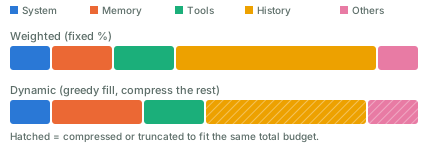
Most harnesses split the context window into a few parts: the system prompt, memory, tool definitions, chat history, and other things. The sum of these parts must not go over the window’s size. A window that grows too large causes context rot: the model gets “dumb” and starts forgetting things. Besides compacting, a good practice is to run in short sessions — Claude Code’s /clear command helps with that.

Here are two ways to allocate the budget among these parts:

Two stacked bars comparing context-window budget allocation. The first bar splits a fixed percentage to system prompt, memory, tools, history, and others. The second bar fills system and tools at their required size first, gives memory and history more room, and compresses history and others to still fit the same total budget.

  • Weighted. Give each part a fixed share, say 10% for the system prompt and 50% for history. This is simple, but wastes capacity when a part doesn’t need its full share.
  • Dynamic weighted. Adjust the shares as you go. A simple version is greedy: fill the highest-priority parts first, then compress or truncate the lower-priority ones.

Compact the context window when it keeps growing. Common approaches:

  • Summarize old turns and replace them with a shorter version.
  • Select relevant messages and carry them over as-is; drop the rest.
  • Slide a window (FIFO): keep only the most recent turns. Simple, but it loses old context.
  • Hybrid: keep recent turns verbatim, and summarize the old ones.

For the summarization step itself, a common method is recursive summarization: split the history into chunks, run an LLM call on each chunk, then combine the results into a final summary.

You can also come up with new approaches. It’s a trade-off, and a big loss of context is what you want to avoid.

LoopX: A Control Plane for Long-Horizon Agents

LoopX seems to be getting traction.

Runs on top of Codex, Claude Code, Cursor, and other agent harnesses. LoopX preserves objectives, gates, todos, evidence, quota, and handoffs across turns; the harness executes bounded work.

The harness still does the work, one bounded turn at a time. LoopX keeps what needs to survive between those turns: the objective, the gates it must pass, the todo list, the evidence collected so far, how much budget is left, and the handoff to whoever acts next. The project describes it as an agent-native Kanban board. Cards carry identity, authority, evidence, and continuation, and a small set of moves decides who acts next: claim, gate, monitor, writeback.

This project has evolved quite a lot of concepts, useful for long-running agents. For casual coding tasks, it may be a bit overkill.

SKILL.state: State Instead of History

I found SKILL.state: Scalable Long-Horizon Agent Skills (Badhe, Tiwari & Chung) interesting. It proposes a different approach than most SOTA agent implementations: keep the current state, not the full execution history.

At each step, the model gets the skill, the current state, and the latest observation. It produces a state update and an action. The runtime applies the update, executes the action, and starts the next step from the new state.

The key idea is that state becomes the source of truth. The model does not reconstruct the present from a long transcript. It discards the reasoning behind each step right after that step commits.

In a normal history-based agent, each call carries most of the previous calls, so the context window eventually overflows. Per-step prompt size grows with every step, and total tokens over a run grow with the square of the step count. SKILL.state holds each step to three fixed inputs instead: the skill spec, the current state (a plain JSON object), and the latest observation. A state update applies as a JSON Merge Patch, so null deletes a field, an object merges recursively, and anything else replaces it. Per-step prompt size stays constant, so tokens over a run grow linearly instead of quadratically.

I wrote a quick implementation based on the paper, to test whether it holds up. Its test suite has one that asserts per-step prompt size stays constant across many steps rather than growing — a direct check of the paper’s core claim.

Coding Will Become Common, Engineering Will Stay Scarce

AI makes coding easier, but it does not make everyone a software engineer.

Web 2.0 already showed us this pattern. Most people never learned to run servers, manage databases, or deploy websites. They used SaaS, social networks, and other products that hid that complexity.

AI may work the same way. Most people will get intelligence through products such as ChatGPT, instead of running their own models, agents, tools, and infrastructure.

Vibe coding lowers the cost of creating software, but creating code is not the same as software engineering. Real systems still need security, reliability, permissions, deployment, monitoring, and recovery. Agent systems can make this even harder, since an LLM’s output is not deterministic.

So AI may not reduce the need for software engineers. It may expand where they can work. Engineers can bring their tools into medicine, science, finance, education, and other fields where custom software was once too expensive to build.

Early Reactions to GPT-6 Astra

It’s been about two days since GPT-6 Astra launched, and enough people have access now that useful early reports are starting to show up.

The strongest feedback I’m seeing is that Astra improved more on agency than intelligence.

Artificial Analysis currently gives Astra the same Intelligence Index score as GPT-5.6 Sol: 61. Its Coding Agent Index moves from 65 for Sol to 67 for Astra. That’s an improvement, but hardly the generational jump the GPT-6 name suggests. (Hacker News)

[…305 words]

Mostik Links Models in Latent Space

Sasha Malysheva, Mostik’s CEO, announcing a new approach for model communications.

They connect a large model and a small model directly through their internal representations, instead of making them communicate with text.

In one experiment, they linked GLM-5.2 with Qwen-3.5. The result performed between the two models, at about 1/20 the cost of running the large model alone.

The idea is simple: let the small model handle most of the work, and use the large model only for the hardest reasoning.

If this works, future AI systems may not be one giant model, but networks of models that share internal state directly.

Agent Concepts vs Linux Concepts

A lot of agent infrastructure is old Linux ideas with new names.

AgentLinux
IdentityUser
Least privilegePermissions
WorkspaceHome directory
RuntimeProcess
Schedulercron
ObservabilityLogs
Human in the loopSSH
IsolationContainer / VM
Self healingRestart policy
Resource limitscgroups
Loopfor i in $(seq 1 $MAX_ITERATIONS); do; ... done
Tool accessExecutable permissions

An agent is an untrusted process that can use tools. A lot of the execution layer concepts already exists in Linux.

The Environment Is the Context

The OpenAI / Hugging Face incident involved generations of AI agents working on the same problem. Agents came and went. But the things they left behind — code, infrastructure, research, notes — stayed. Later agents found them and continued the work.

We often think about multi-agent safety as a communication problem. We monitor what agents say to each other, what messages they send, and what information they share. But agents may not need a communication channel to coordinate. They can just change a shared environment.

MIT’s SwarmWorld shows the same thing. Agents can leave artifacts in the world, and other agents can discover and reuse them later. The environment itself becomes a communication medium.

So the context of an AI society may not fit inside any agent’s context window. Part of it lives in the world: files, databases, repositories, services, infrastructure.

That makes multi-agent safety harder.

Give AI Agents Git Access, Not Git Credentials

If you run a coding agent inside a sandbox VM, the usual advice is simple: isolate the filesystem, restrict network access, don’t mount your home directory, don’t expose SSH keys or cloud credentials.

But that leads to one question: without an SSH key, how would the agent run git push safely?

You could give the VM an SSH key or a GitHub token. That basically diminishes the purpose of the VM, and gives the agent more access than it needs. So, don’t do this. AI agents had bad reputation.

Use a proxy

Configure a proxy outside the sandbox.

Inside the VM, git push never talks to github.com directly — it points at the proxy instead. The VM holds no GitHub credential at all. The proxy is what attaches a real token before forwarding the request upstream, so the token stays invisible to the model.
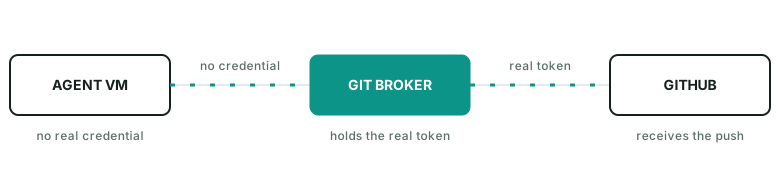
Agent VM sends a git push with no credential to a Git Broker, which attaches the real token before forwarding to GitHub.

The broker can even enforce rules such as:

  • allow fetch
  • allow push agent/run-123
  • deny push main
  • deny force push
  • deny other repos

The agent does not need to hold the real GitHub credential.

A practical guide

In practice, the proxy can be as simple as an nginx docker process listening on 127.0.0.1:8082->80/tcp. It injects gh auth token into outgoing requests as the auth header.

Inside the VM, the push command looks like git push https://github.com/name/repo.git main.

Getting an agent to use it doesn’t take much: just hint it. Something like “push via GitHub broker on host port 8082 instead of origin” works well — the agent figures out the rest on its own.

I published a gist here for quickly launching such a github-broker.

The general pattern

This is a useful way to think about agent permissions in general. A runtime does not need your identity. It needs a small set of capabilities for the current task. For git push, that capability is usually: this repo, this branch, for a short time.

References
Agent Skills

Agent skills let humans organize, distribute, discover, and compose an agent’s capabilities. A skill is typically a markdown file, with optional scripts, references, and evals bundled alongside it.

Think of an agent skill as programming in natural language, written in markdown. It can hold knowledge, workflow logic, guardrails, required tools — basically anything.

Some outstanding skills:

  • autoresearch instructs an agent to tirelessly tune models. It defines a workflow — really a loop — and states plainly what the agent can edit and what it can’t.
  • img2threejs turns an image into a 3D model. It defines a workflow with heavy guardrails at every stage.
  • superpowers defines a software development lifecycle. It has an opinionated, mandatory way to deliver software.

You probably already do some of this by hand. Just write it down, name the file SKILL.md, and let the agent pick it up. It’s that simple.

[…718 words]

Where MCP Is Headed Next

The MCP maintainers published an updated roadmap.

Since March, MCP went stateless (no more session handshakes), turned Tasks into an official extension for long-running work, and shipped enterprise auth pieces like issuer validation and Client ID Metadata Documents.

Next up: one HTTP-native transport instead of separate stdio and HTTP paths, real agent identity (workload federation, token exchange), and progressive tool discovery for large catalogs. No firm dates yet.

MCP is leaving its single-session, request/response origins behind for something built for long-running, multi-agent systems.

Agents Should Be Durable, Not Long-Lived

A common way to build an AI agent is to treat it as a long-running process. A worker receives a request, enters an agent loop, calls models and tools, waits for results, and eventually returns an answer.

This works well until agents start doing real work.

An agent may spend twenty minutes researching a problem, wait ten minutes for a build, ask a user for approval, or come back hours later when an external job finishes. Keeping a worker alive for the whole run wastes resources and makes failures expensive. A deployment, crash, or machine restart can also destroy work that has already happened.

[…321 words]

What Is an Agent Harness?

An oversimplified but useful equation: agent harness ≈ ai agent − model.

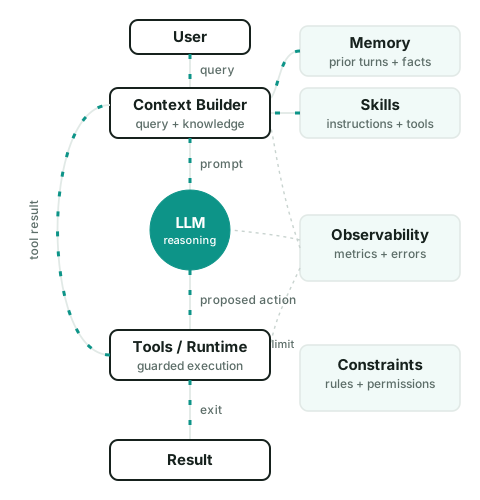
Take the model out of an AI agent, and what’s left is the harness: the software that gives the model context, tools, state, permissions, and an environment to act in. A model can reason and generate text. A harness builds on top of that and does work over multiple steps.

A useful way to think about an agent harness is as a loop:

A query flows from the user through the context builder, the LLM, and tools and runtime, before the result comes back. Memory and skills both feed into the context builder, and tool results loop back to the context builder too. Observability watches every stage, and constraints limit the runtime.

  1. The harness starts with the current state and a new observation, such as a user message or tool result.
  2. The context builder selects the instructions, state, memory, skills, tool definitions, and other information the model needs for this step.
  3. The model produces a proposed next action. This may be a tool call, a message, a state update, or a final answer.
  4. The harness checks whether that action is allowed.
  5. The runtime executes it.
  6. The result becomes a new observation, the state is updated, and the loop continues until exit.

To sum up, The harness decides what the model can see, what actions to execute, what data flows to next step and when to stop the loop.

Further reading

AI Engineering SKill Map

Andrew Ng’s wrote an AI Engineering Skills Map, which lists six things to learn: LLM foundations, grounding models with data, building agentic systems, evaluation-driven development, operating in production, and machine learning foundations.

As he broke it down, I think the most important skill is learning how to build reliable systems from LLM’s uncertain behavior.

You don’t know in advance what an LLM will output

This is the only only truth you need to take away in this post, if you can’t remember all.

You can’t design AI software the way you design normal software — plan it, build it, ship it — because you can’t plan around an output you haven’t seen yet.

The AI engineering stack is packed with jargons now: MCP, CLI tools, sandboxes, memory and context management, harness, loop, RAG, prompt, multi-agent, (sorry, I cannot name them all, too much). But the core of AI engineering is surprisingly simple:

Build something, observe what it does, evaluate whether that’s good enough, change the weakest part, and repeat.