Managing an Agent's Context Window
The context window is an agent’s working memory. Every token in it adds computation, so a longer context window costs more. Managing that budget well is one of the most important engineering decisions in agent design.
Most harnesses split the context window into a few parts: the system prompt, memory, tool definitions, chat history, and other things. The sum of these parts must not go over the window’s size. A window that grows too large causes context rot: the model gets “dumb” and starts forgetting things. Besides compacting, a good practice is to run in short sessions — Claude Code’s /clear command helps with that.
Here are two ways to allocate the budget among these parts:
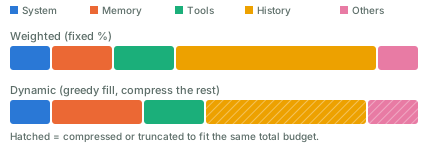
- Weighted. Give each part a fixed share, say 10% for the system prompt and 50% for history. This is simple, but wastes capacity when a part doesn’t need its full share.
- Dynamic weighted. Adjust the shares as you go. A simple version is greedy: fill the highest-priority parts first, then compress or truncate the lower-priority ones.
Compact the context window when it keeps growing. Common approaches:
- Summarize old turns and replace them with a shorter version.
- Select relevant messages and carry them over as-is; drop the rest.
- Slide a window (FIFO): keep only the most recent turns. Simple, but it loses old context.
- Hybrid: keep recent turns verbatim, and summarize the old ones.
For the summarization step itself, a common method is recursive summarization: split the history into chunks, run an LLM call on each chunk, then combine the results into a final summary.
You can also come up with new approaches. It’s a trade-off, and a big loss of context is what you want to avoid.