Give AI Agents Git Access, Not Git Credentials
If you run a coding agent inside a sandbox VM, the usual advice is simple: isolate the filesystem, restrict network access, don’t mount your home directory, don’t expose SSH keys or cloud credentials.
But that leads to one question: without an SSH key, how would the agent run git push safely?
You could give the VM an SSH key or a GitHub token. That basically diminishes the purpose of the VM, and gives the agent more access than it needs. So, don’t do this. AI agents had bad reputation.
Use a proxy
Configure a proxy outside the sandbox.
Inside the VM, git push never talks to github.com directly — it points at the proxy instead. The VM holds no GitHub credential at all. The proxy is what attaches a real token before forwarding the request upstream, so the token stays invisible to the model.
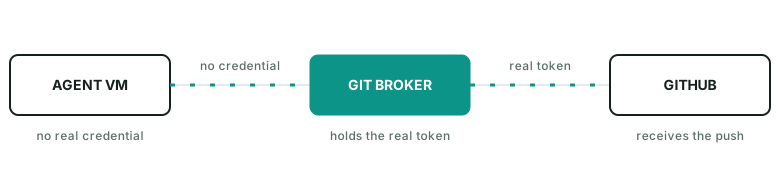
The broker can even enforce rules such as:
- allow fetch
- allow push
agent/run-123 - deny push
main - deny force push
- deny other repos
The agent does not need to hold the real GitHub credential.
A practical guide
In practice, the proxy can be as simple as an nginx docker process listening on 127.0.0.1:8082->80/tcp. It injects gh auth token into outgoing requests as the auth header.
Inside the VM, the push command looks like git push https://github.com/name/repo.git main.
Getting an agent to use it doesn’t take much: just hint it. Something like “push via GitHub broker on host port 8082 instead of origin” works well — the agent figures out the rest on its own.
I published a gist here for quickly launching such a github-broker.
The general pattern
This is a useful way to think about agent permissions in general. A runtime does not need your identity. It needs a small set of capabilities for the current task. For git push, that capability is usually: this repo, this branch, for a short time.