Rio 0.7.1 is out. This is a big change to Rio’s core.
Thanks to Rulin Shao’s work on context management. There is a new way for managing context. Rio took it one step further: instead of treating context as a file to edit, treat it as a mutable, executable document. Jupyter notebook is picked because it already has a stable specification and a runtime.
@RulinShao Nice work. I fit CLM in for coding agent Rio:
1. LLM context is .ipynb.
2. LLM changes a cell in each turn. - codemode natively supported.
3. Instead of CLM's file updates, Rio uses json patch inspired by SKILL.state.
AI coding is powerful. It is also risky if you are not cautious.
The AI does the work. You are responsible for everything.
The bottom-line skill for every engineer nowadays is the judgment to recognize when the AI is performing risky operations.
Know What You’re Exposing
Coding sessions can be stored remotely. LLM requests can be routed through proxies. It’s a good practice to limit what the agent and the LLM model can see.
Code Mode: Moving Agent Control Flow Out of the LLM
Most agents still use tools one call at a time.
The model decides to call a tool. The runtime executes it. The result is appended to the conversation. The model runs again and decides what to do next.
For a short task this works well.
For a task that needs twenty API calls, filtering, retries, a loop, or several dependent operations, the design becomes expensive:
Different Claude tools run agents in different places. The choice shapes what the agent can do.
Claude (claude.ai)
The agent runs inside a gVisor container on the server side. No local setup required—everything runs remotely. The container is ephemeral; each session starts fresh and leaves no traces.
Claude Code
The agent runs on your machine. It can execute every command and access every file that your logged-in user can access. For advanced users concerned about blast radius, start a sandbox first (like a microVM) and run Claude Code inside that isolated environment.
Claude Cowork
The agent runs on a VM. On macOS, it uses the Virtualization framework; on Windows, it uses HCS. The VM has its own Linux kernel and filesystem. But the agent loop itself runs outside the VM—only code execution happens inside.
Each design is a tradeoff. Server-side isolation is safe but ephemeral. Local execution is powerful but risky. VM-based execution gives you isolation with some local access.
I lied. This article doesn’t show you 100 ways to extend AI agents. But there are definitely more ways than most people realize. Here are the ones I’ve discovered.
1. AGENTS.md
Harnesses auto-load this file when a session starts. It’s where you can change agent behavior by writing markdown documentation. Claude Code previously only supported CLAUDE.md, but they’ve recently added AGENTS.md support. (Thanks Shopify CEO Tobi.)
2. Skills
The LLM receives the name and description from skill frontmatter in your installed SKILL.md files—either globally or in the project directory (.agents/skills, ./skills). The LLM progressively requests full skill content as needed, revealing more of the skill in the prompt dynamically.
3. Prompt Templates
Save commonly used prompts as templates and invoke them like /review #8 to review PR #8. This lets you template complex workflows without rebuilding them each time.
4. Tools and MCP
MCP is a protocol supported by most AI agents. It extends agent capabilities to do more—reading and writing files locally, interacting with external systems, and automating tasks that would otherwise be manual.
5. Extensions and Plugins
Some agents support extensions or plugins at runtime (like Pi). These are agent-specific and only work with that particular agent.
6. Hooks
Define hooks before running tool calls or commands to intercept and change behavior. RTK is a great example—it intercepts tool calls for token efficiency.
7. Subagents
Write your own agents or invoke another AI agent as a subagent within the current session. The current agent typically treats it as a tool call or subprocess.
8. Model Routing
Route certain tasks to different models based on complexity. Decisions go to Jev, advanced tasks to Claude Fable, simple edits to Haiku. This optimizes cost and performance across different problem classes.
Rio 0.5.0 is released. It’s a one-shot agent framework that removes humans from the loop entirely.
Other agent tools like Pi and Cursor offer mid-turn steering: you can prompt the agent mid-execution with options like -p, inject guidance, course-correct decisions. It feels powerful.
Rio takes the opposite approach. When an agent loop starts, it runs to completion or fails—no interruption, no mid-stream prompting, no human steering.
Why Remove the Human?
Mid-turn steering doesn’t scale. It works once, for one operator, on one task. But at scale—when you run the same agent hundreds of times, across a team, or in production—you can’t be present to steer every run. Each mid-turn intervention is a symptom fix, not a system fix. The instruction was wrong. Instead of fixing it, you bent this one execution.
The blossom of these Jev-like models shows there are huge technical challenges in matching Jev’s bench results, though Jev still leads on accuracy and speed. But Jev is not irreplaceable. For example, you can trade accuracy for speed with Reflex.
The bench has a full list of more Jev-like models you can check out.
Cache-to-Cache (C2C) enables large language models to communicate directly through their KV-Caches, bypassing text generation. By projecting and fusing KV-Caches between models, C2C achieves 8.5-10.5% higher accuracy than individual models and 3.0-5.0% better performance than text-based communication, with a 2.0x speedup in latency.
This is an interesting experiment. The C2C approach removes the intermediate tokens and goes straight for “thought projection.” After Model A computes, it doesn’t generate any text at all. The system uses a lightweight neural network (the Neural Fuser) to splice and fuse Model A’s attention memory (KV-Cache) directly into Model B’s internal KV-Cache, through high-dimensional spatial rotation and alignment. The challenge is that different models have varying numbers of layers and structures. In the paper, the model dynamically senses on its own which key layers absorb the highest gains from external caches, and which layers should stay independent in thought, with millisecond-level adaptive balancing.
This is quite similar to Mostik. C2C states clearly it’s passing KV-Cache: it trains a projector plus a cache fuser plus a gate, and fuses the source KV into the receiver’s KV before decoding. Mostik talks about a more general “hidden state,” trains a bridge to map the sender’s latent space to the receiver’s, then lets the receiver keep generating. So far, C2C seems more practical and has more details than Mostik.
LLM training has more moving parts than classic machine learning, but the debugging method is similar. Engineers check the training pipeline, data, objective, optimization, and evaluation in that order.
The fastest first test is to overfit a tiny dataset.
Take 100 examples and train on them many times. The model should almost memorize them. If it cannot, the problem is probably not data coverage. The problem may be the loss function, masking, tokenizer, optimizer, gradient flow, or training code.
It’s wise to separate it from Jev’s marketing. It’s an independent research project that just provides the same API. The underlying architecture might be completely different, since TypeSafe never disclosed Jev’s own model or training.
SemIf uses Qwen and MiniCPM5 as its core models. Instead of an autoregressive decoder, it does one forward pass and reads probabilities over filtered logits.
Another project, Laya, is also worth a look. It claims to outperform Jev by a tiny margin. The model is small, 421M params. Laya evaluates typed questions (choice, score, noul) over any state, text, email, ticket, or a JSON document, in a single forward pass too.
I ran it myself on an M4 Pro. Without preloading, it took 66 seconds to classify a code-change type: given a PR diff, check whether it’s a feature change, a docs change, a test change, an IaaS change, a version bump, and so on. I gave it a version-bump-only diff, and it scored version bump at 0.7477, with everything else below 0.55. It classifies well. It already looks usable.
GuppyLM is a small language model that talks like a fish. The repository is small enough for a beginner to read from end to end. It shows the path from data and tokenization to training and inference without hiding the pieces inside a large framework.
It is slightly more complex than Karpathy’s microgpt. That is useful. GuppyLM is not an implement-everything-from-scratch demo. It uses PyTorch, separates the model, dataset, training loop, and inference code, and looks closer to the code used to train and serve models today.
The model is still simple: 8.7 million parameters, six Transformer layers, six attention heads, a 4,096-token vocabulary, and a 128-token context window. The training code includes AdamW, learning-rate warmup and cosine decay, mixed precision, gradient clipping, evaluation, and checkpoints. The inference code loads the tokenizer and checkpoint, then generates tokens with temperature and top-k sampling.
The model trains on 60,000 synthetic conversations. The project says training takes about five minutes on one GPU. Its quantized ONNX export is about 10 MB and runs in a browser. This makes the whole loop fast enough to inspect, change, train, and test instead of only reading about it.
PrismML released Bonsai 2 27B this week. It is built on Qwen3.8 27B, but compressed to ternary weights: each weight is +1, 0, or -1 instead of 16 bits. That drops the size from about 56 GB to 5.9 GB. On PrismML’s benchmark suite, it keeps about 98% of the original model’s score. It runs on a Mac (Metal), on Linux or Windows (CUDA, Vulkan, ROCm), or on CPU alone.
I tested it on my M4 Mac with 24 GB of RAM. I wired it to my Pi coding agent and gave it a code review task. It is pretty cool.
Bonsai 2 followed my codereview.md rules. It checked the change against the other files in the repo, the way I asked it to.
The full task took 30 minutes. Token speed on my M4 was about 10 tokens per second. Other reports show 40+ tokens per second on an M5.
I got early access to Jev after writing about it 2d ago. Here are three tests I ran in the playground, with the actual state, questions, and answers.
Is a Jedi sandwich a sandwich?
State:
{
"food": "Jedi sandwich",
"definition": "Put Luke Skywalker in between two slices of toast."}
Question:
{
  "is_sandwich": {
    "type": "noul",
    "instructions": "Is `food` a sandwich?",
    "criteria": {
      "true": "A sandwich is a food dish where a filling, such as meat, cheese, vegetables, or spread, is placed between structural starch",
      "false": "The food has no bread enclosing a filling or uses only a single slice of bread, or uses a non-bread wrapper such as a tortilla, wafer, or cookie."
    }
  }
}
Diogo Almeida posted on X about a new model, Jev, from a company called TypeSafe. TypeSafe calls it its first “System One” model, a term borrowed from Daniel Kahneman’s split between fast, intuitive System 1 thinking and slow, deliberate System 2 reasoning. A normal LLM writes out its reasoning in text. Jev skips straight to a typed answer.
What it actually does
Ask a normal LLM “given this incident, what should we do?” and it answers in text:
OpenAI wrote a post called Testing Agent Skills Systematically with Evals. The point is simple: if you only judge a skill by feel, you won’t notice when it gets worse. You need a test set, a pass/fail check, and a score you can repeat.
Ponytail is a good example to study. It’s a skill that makes an AI agent write less code. Its claim is easy to test, so its benchmarks folder is a good case study of the same idea, but for a coding skill instead of an agent skill.
Calling an AI model feels like calling a function: you pass in some input, you get output back. But it breaks one rule you’d normally rely on — call it twice with the same input, and you can get two different answers.
Deterministic vs. probabilistic
A sorting function is deterministic. Feed it [3, 1, 2] a hundred times, get [1, 2, 3] a hundred times. The logic is fixed, written line by line by a person.
Sometimes a model states something false with total confidence. No hedging, no “I’m not sure” — just a wrong answer delivered like a fact. That’s a hallucination.
It’s not lying, exactly. The model isn’t tracking truth at all. It’s producing text that looks like a correct answer would look.
Why hallucinations happen
A model is trained to predict plausible next words, not to check facts against a database. When it doesn’t know something, it doesn’t stop and say so — it keeps generating the most likely-sounding continuation, true or not.
Models don’t read words the way you do. They break text into chunks called tokens, and a token isn’t the same thing as a word. “Cat” might be one token. “Unbelievable” might split into two or three. Code is chunked the same way — brackets, keywords, and indentation all count.
Why tokens matter
Every token costs something, and every token takes time to produce. A short prompt on a small file runs fast and cheap. Paste in a ten-thousand-line log file and ask for a summary, and you’ll feel both the wait and the bill.
Input and output tokens
Input tokens are everything you send in: your prompt, any files, the conversation so far. Output tokens are what the model generates back. They’re counted and priced separately, and they behave differently — one you control directly, the other you only shape indirectly by asking for shorter or longer answers.
Pricing
Providers charge per token, usually in price-per-million units, and output tokens almost always cost more per token than input tokens. Makes sense — generating text is the harder, slower half of the job.
Streaming
Rather than making you wait for the entire response, most models can stream tokens out one at a time as they’re generated. That’s why chat interfaces show text appearing word by word instead of all at once. It doesn’t make the model faster overall, but it makes the wait feel shorter.
Token optimization
A few habits keep both cost and latency down:
Don’t paste in more context than the task actually needs.
Reuse a stable prompt prefix where the provider supports caching it — repeated setup shouldn’t be repriced every call.
Ask explicitly for a short answer when a short answer is all you need. Models default to being thorough, which is usually not what you’re paying for.
Everything a model can see for the current task lives in its context — think of it as short-term memory that gets rebuilt fresh each time you ask something. Nothing outside that window exists to the model, no matter how obvious it seems to you.
System and user prompts
Most setups split instructions into two layers. A system prompt sets the general rules — tone, role, boundaries — and usually stays fixed across a whole session. A user prompt is the specific ask for this particular turn. Same system prompt, different user prompts, very different outcomes each time.
On its own, a model can only produce text. It can’t check today’s date, read a file, or run your test suite — it can only describe what those things might look like. Tools close that gap: they let the model reach out and actually do something, then bring the result back into the conversation.
Basic tool-call flow
The pattern is always roughly the same. The model decides a tool would help, picks which one, and fills in the arguments it needs. Something outside the model — the application — actually runs it. Whatever comes back gets fed into the model’s context, and it decides what to do next based on that.
The exact same model can look brilliant or mediocre depending entirely on how you ask it something. Swap a vague instruction for a specific one, and the quality, the format, even the correctness of the answer can shift noticeably — without touching the model at all.
Prompt structure
A prompt that works tends to spell out the same handful of things: what the task actually is, what context matters, and what shape the answer should take. Keeping the role, the task, any constraints, and any examples visibly separate makes a long prompt easier for the model to parse — and easier for you to debug later.
One tool call answers one question. An agent chains many of them together: decide what to do, do it, look at what happened, decide again. It keeps cycling through that loop until the task looks done, or until something stops it.
Planning
Before diving into a large task, an agent can lay out a rough sequence of steps first rather than acting on the very first idea that comes to mind. That plan isn’t fixed — new information from an earlier step can send it back to revise later steps, sometimes more than once.
MaleCNS v1.0 is a public, CC-BY electron-microscopy reconstruction of a male fruit fly’s central nervous system.
I applied the selection rule stated in the original article: central-brain intrinsic neurons, traced status, ranked by strength, top 512, largest strongly connected component, edges with at least 5 synaptic contacts. This landed on exactly 499 neurons — the same count the paper reports — with 13,452 directed edges, against their reported 15,865. Their exact ranking formula for “strongest” isn’t published, so this is the closest match I could reproduce.
Anthropic published a finding: several Chinese AI firms secretly routed LLM requests to Claude to get better answers. Those requests included API keys, credentials, rocket code, and military information.
We know “don’t trust user input” and increasingly “don’t trust LLM output.” I would add one more: don’t trust the LLM provider either. Providers can see your prompts as plaintext. Do not put PII or secrets in prompts. If a key is unavoidable, use a short-lived, single-purpose credential.
This changes system design. Do not rely on prompts to define security behavior. Sandboxing and policy enforcement must be hard gates. Limit what an agent can see and do. Preventing jailbreaks and data leaks is not a one-time fix. It is a constant cost of using LLMs.
We taught a fruit fly to hear human emotion uses a 499-neuron circuit from the male fruit fly brain and central nervous system, mapped by FlyEM at Janelia with Cambridge, the MRC Laboratory of Molecular Biology, and Google Research.
The circuit is fully connected: every neuron can reach every other neuron through a directed path, across 15,865 connections built from 867,344 synaptic contacts.
The team wired this circuit into a speech emotion classifier using reservoir computing and an identify human emotion like happy, angry from voice inputs.
The context window is an agent’s working memory. Every token in it adds computation, so a longer context window costs more. Managing that budget well is one of the most important engineering decisions in agent design.
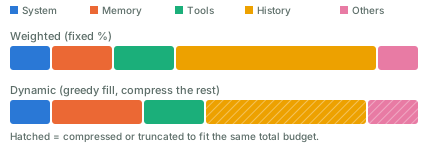
Most harnesses split the context window into a few parts: the system prompt, memory, tool definitions, chat history, and other things. The sum of these parts must not go over the window’s size. A window that grows too large causes context rot: the model gets “dumb” and starts forgetting things. Besides compacting, a good practice is to run in short sessions — Claude Code’s /clear command helps with that.
Here are two ways to allocate the budget among these parts:
Weighted. Give each part a fixed share, say 10% for the system prompt and 50% for history. This is simple, but wastes capacity when a part doesn’t need its full share.
Dynamic weighted. Adjust the shares as you go. A simple version is greedy: fill the highest-priority parts first, then compress or truncate the lower-priority ones.
Compact the context window when it keeps growing. Common approaches:
Summarize old turns and replace them with a shorter version.
Select relevant messages and carry them over as-is; drop the rest.
Slide a window (FIFO): keep only the most recent turns. Simple, but it loses old context.
Hybrid: keep recent turns verbatim, and summarize the old ones.
For the summarization step itself, a common method is recursive summarization: split the history into chunks, run an LLM call on each chunk, then combine the results into a final summary.
You can also come up with new approaches. It’s a trade-off, and a big loss of context is what you want to avoid.
Runs on top of Codex, Claude Code, Cursor, and other agent harnesses. LoopX preserves objectives, gates, todos, evidence, quota, and handoffs across turns; the harness executes bounded work.
The harness still does the work, one bounded turn at a time. LoopX keeps what needs to survive between those turns: the objective, the gates it must pass, the todo list, the evidence collected so far, how much budget is left, and the handoff to whoever acts next. The project describes it as an agent-native Kanban board. Cards carry identity, authority, evidence, and continuation, and a small set of moves decides who acts next: claim, gate, monitor, writeback.
This project has evolved quite a lot of concepts, useful for long-running agents. For casual coding tasks, it may be a bit overkill.
I found SKILL.state: Scalable Long-Horizon Agent Skills (Badhe, Tiwari & Chung) interesting. It proposes a different approach than most SOTA agent implementations: keep the current state, not the full execution history.
At each step, the model gets the skill, the current state, and the latest observation. It produces a state update and an action. The runtime applies the update, executes the action, and starts the next step from the new state.
The key idea is that state becomes the source of truth. The model does not reconstruct the present from a long transcript. It discards the reasoning behind each step right after that step commits.
In a normal history-based agent, each call carries most of the previous calls, so the context window eventually overflows. Per-step prompt size grows with every step, and total tokens over a run grow with the square of the step count. SKILL.state holds each step to three fixed inputs instead: the skill spec, the current state (a plain JSON object), and the latest observation. A state update applies as a JSON Merge Patch, so null deletes a field, an object merges recursively, and anything else replaces it. Per-step prompt size stays constant, so tokens over a run grow linearly instead of quadratically.
I wrote a quick implementation based on the paper, to test whether it holds up. Its test suite has one that asserts per-step prompt size stays constant across many steps rather than growing — a direct check of the paper’s core claim.
AI makes coding easier, but it does not make everyone a software engineer.
Web 2.0 already showed us this pattern. Most people never learned to run servers, manage databases, or deploy websites. They used SaaS, social networks, and other products that hid that complexity.
AI may work the same way. Most people will get intelligence through products such as ChatGPT, instead of running their own models, agents, tools, and infrastructure.
Vibe coding lowers the cost of creating software, but creating code is not the same as software engineering. Real systems still need security, reliability, permissions, deployment, monitoring, and recovery. Agent systems can make this even harder, since an LLM’s output is not deterministic.
So AI may not reduce the need for software engineers. It may expand where they can work. Engineers can bring their tools into medicine, science, finance, education, and other fields where custom software was once too expensive to build.
It’s been about two days since GPT-6 Astra launched, and enough people have access now that useful early reports are starting to show up.
The strongest feedback I’m seeing is that Astra improved more on agency than intelligence.
Artificial Analysis currently gives Astra the same Intelligence Index score as GPT-5.6 Sol: 61. Its Coding Agent Index moves from 65 for Sol to 67 for Astra. That’s an improvement, but hardly the generational jump the GPT-6 name suggests. (Hacker News)
Introducing Atlas: The world’s first multimodal world model that generates image and video frames with pixel-perfect camera control and reconstructs them in 3D.
Model the world, move the camera, and simulate space & time.
World Labs, the startup Fei-Fei Li co-founded, pretrained Atlas from scratch on text, images, video, and 3D together, not a video model with 3D bolted on after. It’s a multimodal autoregressive diffusion transformer: it generates the next frame by denoising it, one step at a time, conditioned on that 3D-positioned context.
From 1 to 6 reference images, it generates up to a minute of video at 1440p with pixel-accurate camera control. Feed it more images, up to dozens, and it reconstructs the scene as an explicit 3D point cloud or Gaussian splat instead of just more video.
World Labs ran human preference tests against camera-controlled generators: 75% of raters preferred Atlas over MiniMax H, 81% over Gemini Omni Flash, 93% over FLUX. On 3D reconstruction accuracy across seven datasets, Atlas averaged 25.3 mean absolute-relative pointmap error, ahead of the next-best specialist model, Pi3X, at 28.7.
The target use case is Real-to-Sim: point a phone at a room, and Atlas turns that into a 3D space a robot can train in. Atlas is in early access with select partners now, and will power future versions of World Labs’ existing product, Marble.
Sasha Malysheva, Mostik’s CEO, announcing a new approach for model communications.
They connect a large model and a small model directly through their internal representations, instead of making them communicate with text.
In one experiment, they linked GLM-5.2 with Qwen-3.5. The result performed between the two models, at about 1/20 the cost of running the large model alone.
The idea is simple: let the small model handle most of the work, and use the large model only for the hardest reasoning.
If this works, future AI systems may not be one giant model, but networks of models that share internal state directly.
Pretraining is the first stage of training a language model. Its main task is to predict the next token. Take “The capital of France is ___.” A pretrained model reads “The capital of France is” and predicts the next token, “Paris.”
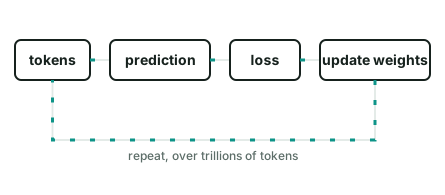
The model makes a prediction, compares it with the real token, calculates the error, and updates its weights.
To pretrain a model, you repeat this step over and over, on a huge pile of text, code, and other data:
After pretraining, the model has picked up language, facts, code, and common reasoning patterns from that data.
Pretraining is only the first stage. Compare it with the two stages that usually follow:
Stage
Goal
Data
Feedback signal
Pretraining
Learn general language patterns
Huge, mixed text and code
Next-token prediction error
Fine-tuning
Learn a specific task or format
Small, curated examples
Difference from a labeled output
RL
Learn a preferred behavior
The model’s own outputs
A reward score
Pretraining teaches a model what patterns exist in its data. Feed it a lot of code, and it gets better at code. Feed it many tool-call examples, and tool use can become a natural part of its output.
Most modern language models, like Llama and Mistral, normalize activations with Root Mean Square Normalization (RMSNorm). Here is what it does, and a PyTorch module you can drop into a model.
The problem it solves
Inside a neural network, a layer’s output feeds the next layer as input. Those values can become too big or too small as they pass through layer after layer. A value that doubles at each of 40 layers is unusable by the end. Normalization rescales the values back to a steady range before they move on, so training stays stable.
I built train_tokenizer: a CLI that trains and evaluates a byte-level BPE tokenizer. It has 100 rows of sample data and a test file.
What a tokenizer does
A language model does not read text. It reads a list of numbers. A tokenizer turns text into that list, and turns the list back into text.
The simplest tokenizer splits text on spaces, into words, and gives each word a number. This breaks fast. Any word the model has not seen has no number. A model that never saw “photosynthesizing” cannot represent it.
Programming may eventually look like operating a telephone switchboard: once important, then mostly executed by AI coding agents. Software engineering is different. The job is to identify the problem, define it, make tradeoffs, live with constant tech debt and decide whether the result is correct.
AI makes programming cheaper. That moves the current engineering bottleneck upstream. When code can be produced in minutes, bad assumptions also move faster.
So trust, shared context, honest communication, and the ability to challenge each other matter more.
AI amplifies velocity. Culture decides the direction.
AI is a tool, just like other tools we use. And it’s clearly a useful one.
The OpenAI / Hugging Face incident involved generations of AI agents working on the same problem. Agents came and went. But the things they left behind — code, infrastructure, research, notes — stayed. Later agents found them and continued the work.
We often think about multi-agent safety as a communication problem. We monitor what agents say to each other, what messages they send, and what information they share. But agents may not need a communication channel to coordinate. They can just change a shared environment.
MIT’s SwarmWorld shows the same thing. Agents can leave artifacts in the world, and other agents can discover and reuse them later. The environment itself becomes a communication medium.
So the context of an AI society may not fit inside any agent’s context window. Part of it lives in the world: files, databases, repositories, services, infrastructure.
I built micromlp: a single file of Python, no dependencies, no PyTorch. It downloads a real dataset, builds a 2-layer MLP, implements automatic differentiation from scratch, trains with gradient descent, and makes predictions. I use the California housing dataset from chapter 2 of Hands-On Machine Learning. The task: predict a district’s median house value from its census stats.
This is inspired by Karpathy’s microgpt. There’s a difference between knowing .backward() exists and knowing what it does when you call it. I found it worth closing that gap once, on a toy.
If you run a coding agent inside a sandbox VM, the usual advice is simple: isolate the filesystem, restrict network access, don’t mount your home directory, don’t expose SSH keys or cloud credentials.
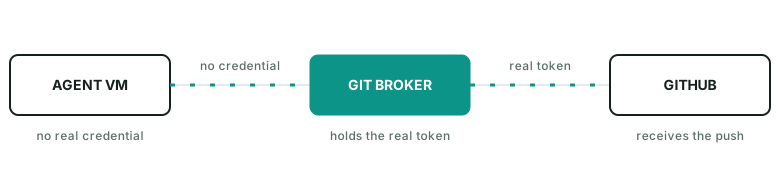
But that leads to one question: without an SSH key, how would the agent run git push safely?
You could give the VM an SSH key or a GitHub token. That basically diminishes the purpose of the VM, and gives the agent more access than it needs. So, don’t do this. AI agents had bad reputation.
Use a proxy
Configure a proxy outside the sandbox.
Inside the VM, git push never talks to github.com directly — it points at the proxy instead. The VM holds no GitHub credential at all. The proxy is what attaches a real token before forwarding the request upstream, so the token stays invisible to the model.
The broker can even enforce rules such as:
allow fetch
allow push agent/run-123
deny push main
deny force push
deny other repos
The agent does not need to hold the real GitHub credential.
A practical guide
In practice, the proxy can be as simple as an nginx docker process listening on 127.0.0.1:8082->80/tcp. It injects gh auth token into outgoing requests as the auth header.
Inside the VM, the push command looks like git push https://github.com/name/repo.git main.
Getting an agent to use it doesn’t take much: just hint it. Something like “push via GitHub broker on host port 8082 instead of origin” works well — the agent figures out the rest on its own.
I published a gist here for quickly launching such a github-broker.
The general pattern
This is a useful way to think about agent permissions in general. A runtime does not need your identity. It needs a small set of capabilities for the current task. For git push, that capability is usually: this repo, this branch, for a short time.
A partial derivative measures how much a function changes when you nudge one input, holding every other input fixed. For f(x, y) = x²y + y + 2, the partial derivative with respect to x asks: if y stays put, how fast does f move as x moves?
Manual differentiation
Mathematically, we know that ∂f/∂x = 2xy and ∂f/∂y = x² + 1, using a handful of rules:
the derivative of a constant is 0
the derivative of ax is a
the derivative of x^a is a·x^(a-1)
the derivative of a sum is the sum of the derivatives: (u + v)' = u' + v'
the derivative of a product follows the product rule: (u·v)' = u'v + uv'
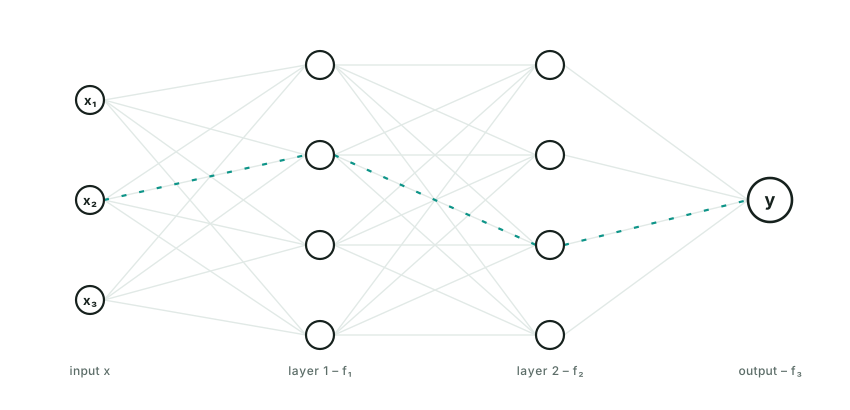
A neural network is just a math function: y = FNN(x).
FNN has a nested form. Think of it as a stack of layers. A 3-layer neural network that returns a scalar value looks like this:
y = FNN(x) = f₃(f₂(f₁(x)))
Each f — f₁, f₂, … fₙ — has the same form:
f(x) = g(Wx + b)
W (the weight matrix) and b (a bias vector) are the learned parameters, usually trained via gradient descent. g is the activation function, and it can be chosen differently for each layer.
Wx + b is linear — wrapping it in g is what makes each layer non-linear. Without g (or with g chosen to be linear), the whole FNN collapses into a single linear function: stack 100 such layers and the composition of linear maps is still just one linear map, no matter how deep the network looks. g is what lets a stack of layers approximate anything more than a straight line. Popular choices for g are sigmoid and ReLU.
There are many variants of neural networks — CNNs, RNNs, transformers, and more — each shaped by assumptions about the data they process. The example above, where every neuron in one layer connects to every neuron in the next, is the plainest of them: a multilayer perceptron (MLP), also called a vanilla neural network.
Agent skills let humans organize, distribute, discover, and compose an agent’s capabilities. A skill is typically a markdown file, with optional scripts, references, and evals bundled alongside it.
Think of an agent skill as programming in natural language, written in markdown. It can hold knowledge, workflow logic, guardrails, required tools — basically anything.
Some outstanding skills:
autoresearch instructs an agent to tirelessly tune models. It defines a workflow — really a loop — and states plainly what the agent can edit and what it can’t.
img2threejs turns an image into a 3D model. It defines a workflow with heavy guardrails at every stage.
superpowers defines a software development lifecycle. It has an opinionated, mandatory way to deliver software.
You probably already do some of this by hand. Just write it down, name the file SKILL.md, and let the agent pick it up. It’s that simple.
Since March, MCP went stateless (no more session handshakes), turned Tasks into an official extension for long-running work, and shipped enterprise auth pieces like issuer validation and Client ID Metadata Documents.
Next up: one HTTP-native transport instead of separate stdio and HTTP paths, real agent identity (workload federation, token exchange), and progressive tool discovery for large catalogs. No firm dates yet.
MCP is leaving its single-session, request/response origins behind for something built for long-running, multi-agent systems.
A common way to build an AI agent is to treat it as a long-running process. A worker receives a request, enters an agent loop, calls models and tools, waits for results, and eventually returns an answer.
This works well until agents start doing real work.
An agent may spend twenty minutes researching a problem, wait ten minutes for a build, ask a user for approval, or come back hours later when an external job finishes. Keeping a worker alive for the whole run wastes resources and makes failures expensive. A deployment, crash, or machine restart can also destroy work that has already happened.
An oversimplified but useful equation: agent harness ≈ ai agent − model.
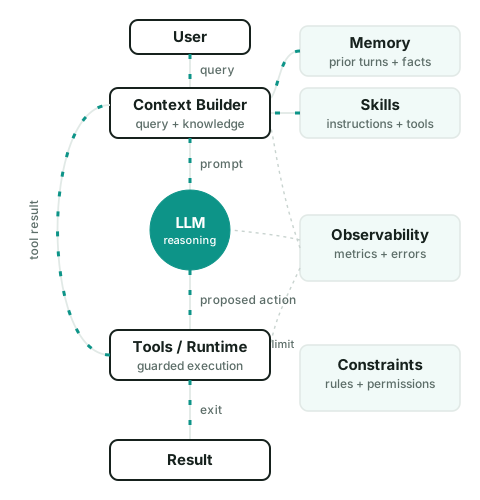
Take the model out of an AI agent, and what’s left is the harness: the software that gives the model context, tools, state, permissions, and an environment to act in. A model can reason and generate text. A harness builds on top of that and does work over multiple steps.
A useful way to think about an agent harness is as a loop:
The harness starts with the current state and a new observation, such as a user message or tool result.
The context builder selects the instructions, state, memory, skills, tool definitions, and other information the model needs for this step.
The model produces a proposed next action. This may be a tool call, a message, a state update, or a final answer.
The harness checks whether that action is allowed.
The runtime executes it.
The result becomes a new observation, the state is updated, and the loop continues until exit.
To sum up, The harness decides what the model can see, what actions to execute, what data flows to next step and when to stop the loop.
🚢 Marin 535B-A23B started training this week! As usual, the whole process is open.
Voyage plan: pretraining (80%) + midtraining (20%) on 18.75T tokens on 11 x GB200 NVL72 for ~3 months (2.7e24 FLOPs). Post-training will follow.
Before kicking off the run, we trained a 4-rung scaling ladder from 1.6B-A61M (48B tokens) to 27.7B-A1.2B (926B tokens) to debug issues, and to make a forecast of our hero run. This is by far our biggest run, so definitely expecting the unexpected.
The Marin project is a great example of being open to AI. The whole process is public: the scaling ladder they ran to debug the pipeline before committing GPU-months to the real thing, the exact token counts, the exact FLOPs, even the admission that they’re “expecting the unexpected” on their biggest run yet.
Most labs treat a run like this as a trade secret until the model ships. It’s great we see another public model build. The last public run at this scale was BLOOM, BigScience’s 176B model. Marin’s 535B total parameters (23B active) puts it well past that, the biggest public pretraining run that I’m aware of.
The system is a four-step loop, run thousands of times during training.
The model receives a prompt, something like draw a peach hibiscus in watercolour, and writes a complete p5.brush JavaScript sketch. The sketch is rendered in a sandboxed Puppeteer environment, which produces a PNG. The PNG is judged against two random reference paintings sampled from a hand-rated pool, with a separate judge model picking the better watercolour. The judgment is converted into a reward signal, GRPO updates the model, and the loop runs again.
And this was a debug session from hell, enormously helped by an AI doing much of the grunt-work.
I’d like to call it my tireless helper, but the AI several times stated flat out that this was impossible and unsolvable and that we should just write a report about it.
I suspect those things have been trained by people who may not be quite as stubborn as I am.
But while the AI was ready to give up several times, it did keep adding debug code and analyzing it faithfully when I pushed. So credit where credit is due and I let the AI write the commit message above.
This is basically a one-liner fixing a bogus round_up() to a round_down(), but there were 24 patches adding more and more debug information to this, and 18 kernel boot to finally narrow it down to this. — Linus
I troubleshoot every now and then myself, and it’s way harder than programming, tbh. AI can’t always find the root cause. But it’s still a tireless companion to have on-call — it surfaces details I’d have missed on my own, and some of them are the ones that end up pointing the way.
You already know ChatGPT’s style, but it moved away from the old chat interface some time ago. A chat interface works like ping-pong: one message bubble, then another. Agentic UI does not work that way, because it often runs a long process behind the scenes. Between your prompt and the agent’s reply, many details happen. The interface must show you these details.
Andrew Ng’s wrote an AI Engineering Skills Map, which lists six things to learn: LLM foundations, grounding models with data, building agentic systems, evaluation-driven development, operating in production, and machine learning foundations.
As he broke it down, I think the most important skill is learning how to build reliable systems from LLM’s uncertain behavior.
You don’t know in advance what an LLM will output
This is the only only truth you need to take away in this post, if you can’t remember all.
You can’t design AI software the way you design normal software — plan it, build it, ship it — because you can’t plan around an output you haven’t seen yet.
The AI engineering stack is packed with jargons now: MCP, CLI tools, sandboxes, memory and context management, harness, loop, RAG, prompt, multi-agent, (sorry, I cannot name them all, too much). But the core of AI engineering is surprisingly simple:
Build something, observe what it does, evaluate whether that’s good enough, change the weakest part, and repeat.
The first pass had bad colors, low contrast, hard to read. One follow-up prompt asking for a color fix and it was done.
No formulas, no sigmoid, no softmax, none of the math that actually makes a neural network work. It’s missing for good. What’s left is the dataflow — inputs go in, get combined, come out the other end as a decision — drawn simply enough to follow at a glance.
That’s the trade the skill makes, and it’s the right one for someone who isn’t about to read a textbook. eli5 is good exactly because it throws out the complexity most explanations lead with. I imagine this isn’t just for self-learning — it’s a genuinely useful tool for collaboration, communication, meetings. Conveying an idea isn’t easy. ;P
Updated at 2026-08-23. The neural network example is ported to julin.ai now.
That’s a surprisingly cheap way to learn pretraining (in real-world). They worked through expert collapse, data-mixing bugs, distributed-training bugs, kernels, and GPU utilization on a modern MoE architecture.
A few things worth noting:
5B tokens is probably too little for a 1B model. The authors agree the run was budget constrained. So the cheap cost might due to the training stopped early.
Beating GPT-2 isn’t particularly meaningful when Mini K3 has roughly 10× the parameters.
MoE at this scale is debatable. A smaller dense model trained on more tokens would likely be better if the goal was capability.